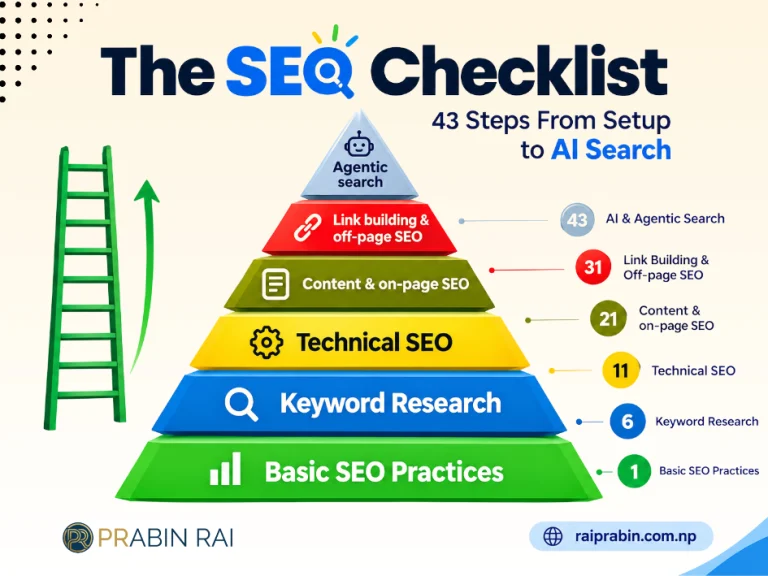
SEO comes down to 43 tasks across six stages: setup, keyword research, technical health, on-page content, links, and AI search. Work through them in that order, because each stage depends on the one before it. There is no point polishing title tags on pages Google cannot index.
Most ranking problems trace back to a skipped step, and a checklist makes those missed steps obvious. This SEO checklist is adapted and refined by Prabin Rai to provide a practical, step-by-step approach to improving search visibility. Each section lists the essential tasks, explains why they matter, and recommends the tools that can help get the job done. Tool names are mentioned where relevant, but any equivalent SEO audit, keyword research, or optimization tool can be used.
1. Basic SEO practices
These seven tasks make your site measurable and visible to search engines. Do them once, before anything else.
- Set up Google Search Console and Bing Webmaster Tools. They show which queries bring visitors and which pages have problems.
- Set up Google Analytics 4. Search Console tells you how people arrive, and GA4 tells you what they do next.
- Install an SEO plugin. On WordPress and similar platforms, a plugin handles titles, sitemaps, and canonical tags without code.
- Create a sitemap. An XML sitemap lists the pages you want crawled. Submit it in both webmaster tools.
- Create a robots.txt file. It tells crawlers which areas to skip, such as admin and cart pages.
- Check for manual actions. A penalty in Search Console holds back every other effort until you resolve it.
- Ensure indexability. Confirm key pages are not blocked by a stray noindex tag or robots.txt rule.
Tools: Google Search Console, Google Analytics, Bing Webmaster Tools, Site Audit.
2. Keyword research
Keyword research decides which pages you build and what each one targets. Six tasks cover it.
- Identify competitor keywords. See which terms rivals rank for and you do not. Those gaps are your quickest wins.
- Find topics with a keyword tool. Start from a seed term and collect related phrases with their volume and difficulty.
- Identify AI prompts. People ask assistants longer, conversational questions. Note the prompts where your brand should appear.
- Create a keyword map. Assign one primary keyword to one URL so pages do not compete with each other.
- Analyze search intent. Look at the current top results. If they are all guides, a product page will struggle to rank.
- Find questions. Mine People Also Ask boxes and Reddit threads for the exact wording your audience uses.
Record the results in one spreadsheet with three columns: keyword, intent, and target URL. Every later section draws on it.
Tools: Keyword Magic Tool, Keyword Strategy Builder, AI Visibility Toolkit, Google Search, Keyword Gap.
3. Technical SEO
Technical SEO removes the obstacles between your content and the crawler. It is the longest section, with twelve tasks, because one fault here can undo good content.
- Use HTTPS. Secure connections protect users, and Google treats HTTPS as a ranking signal.
- Fix duplicate site versions. Only one version of your domain should load, whether www or non-www. Redirect the rest to it.
- Fix crawl errors. Review 404s and server errors in Search Console’s page indexing report.
- Improve site speed. Compress images, trim unused scripts, and test against Core Web Vitals. Slow pages lose visitors before they read a word.
- Fix broken links. Dead internal and outbound links waste crawl budget and frustrate readers.
- Fix HTTP links. Update internal links that still point to HTTP URLs so they skip an unnecessary redirect.
- Prioritize mobile usability. Google indexes and ranks from the mobile version of your site, so test there first.
- Use a clean URL structure. Short, descriptive, lowercase URLs with hyphens are easier to read and share.
- Add structured data. Schema markup helps search engines understand products, reviews, FAQs, and articles.
- Optimize crawl depth. Keep important pages within three clicks of the homepage.
- Check temporary redirects. A 302 signals a short-term move. Use a 301 when the change is permanent.
- Fix redirects. Remove chains and loops so each old URL reaches its destination in one hop.
Tools: Site Audit, PageSpeed Insights, Chrome DevTools.
4. Content and on-page SEO
On-page SEO makes each page clear about its topic, to readers and to search engines. There are ten tasks, and most are fixes a site audit will surface.
- Fix title tags. Every page needs a unique title that leads with its keyword and fits in roughly 60 characters.
- Fix meta descriptions. Write a unique summary for each page that gives searchers a reason to click. Keep it under about 155 characters.
- Fix H1 issues. Use one H1 per page that states the topic. Missing and duplicate H1s are common audit findings.
- Optimize content. Cover the topic fully, answer the query early, and match the intent you identified in keyword research.
- Audit your content. Sort pages into keep, improve, merge, or remove based on traffic and conversions.
- Add alt text. Describe each meaningful image. It helps screen-reader users and image search.
- Improve internal linking. Link from strong pages to the ones you want to rank, using descriptive anchor text.
- Fix cannibalization. When two pages target the same keyword, merge them or point each at a different term.
- Fix orphan pages. A page with no internal links pointing to it is hard for crawlers and users to find.
- Update content regularly. Refresh statistics, examples, and dates on pages whose rankings are slipping.
Tools: Google Analytics, Site Audit, Google Search Console, Position Tracking, On Page SEO Checker.
5. Link building and off-page SEO
Backlinks remain a strong signal of trust, and five tasks cover earning them.
- Analyze backlinks. Review who links to you now, which pages attract links, and which links look spammy.
- Do a backlink gap analysis. Find sites that link to several competitors but not to you. They already link to your kind of content.
- Turn mentions into backlinks. When a site names your brand without linking, ask politely for the link.
- Find new link opportunities. Pitch original data, guest articles, and replacements for broken links on relevant sites.
- Optimize your Google Business Profile. For local businesses, accurate hours, categories, photos, and reviews drive map visibility.
Tools: Backlink Analytics, Backlink Gap, Link Building Tool, Google Business Profile, Brand Monitoring.
6. Agentic search best practices
AI assistants now answer questions directly, so being cited in those answers is the newest part of SEO. Three tasks get you started.
- Audit AI visibility. Ask ChatGPT, Gemini, and similar assistants the prompts you collected during keyword research. Record whether your brand appears and which sources they cite.
- Structure content for AI. Use clear headings, direct answers near the top, short paragraphs, and tables for comparisons. Self-contained passages are easier to quote.
- Consider LLMs.txt. This proposed file gives language models a plain summary of your key pages. Adoption is still uneven, so treat it as a low-cost experiment.
Tools: AI Visibility Toolkit, plus the assistants themselves, such as ChatGPT and Gemini.
Our Recommended Website
Visit our recommended website for authentic gadget store in Nepal – Computer Durbar and best website design in Nepal – Suryani International.
How to use this checklist
Run the first two sections once, then repeat the rest on a schedule. Setup and keyword mapping are foundations. Technical audits are worth rerunning monthly, since new errors appear as a site grows. Content updates and link building never finish.
Recheck AI visibility every quarter, because assistant answers shift as models update.
Prabin Rai, an SEO expert in Nepal, recommends prioritizing indexability, title tags, and internal linking when time is limited, as these tasks are cost-effective and can benefit every page. Then, tackle one task each week until all 43 SEO checklist items are completed.